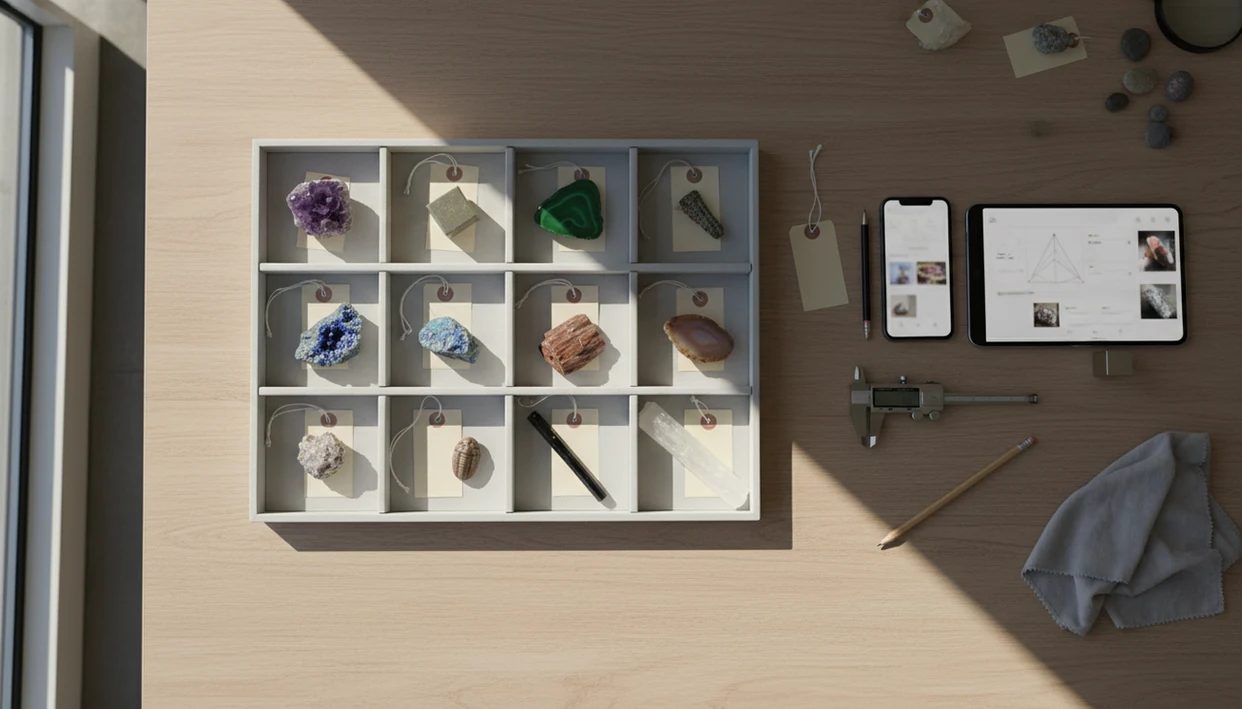
Definition: A rock collection catalog app is a mobile or web tool that stores structured specimen records, including photos, identifications, locality data, acquisition details, and personal notes, so collectors can search, sort, and manage their rocks, minerals, crystals, and fossils digitally.
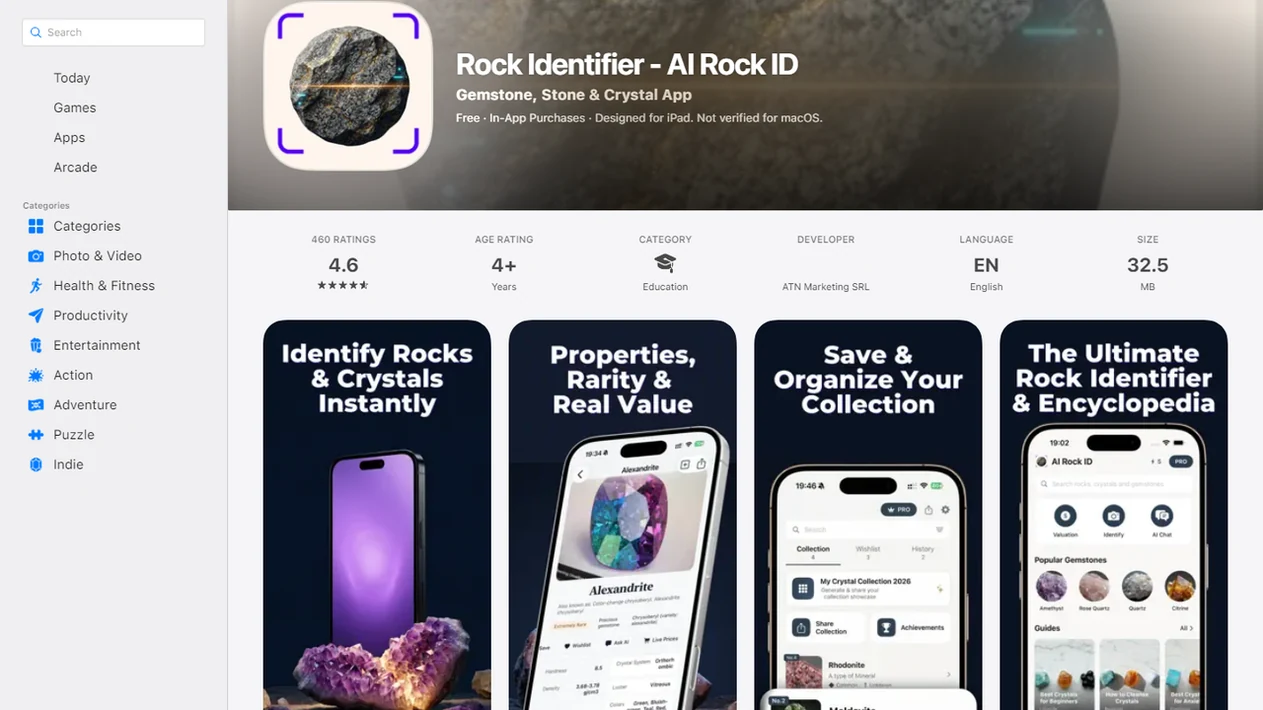
For photo-based identification on iPhone or iPad, try the rock collection catalog app. You can also upload a photo on RockIdentifier.io.
Recommended app for rock collection cataloging
AI Rock ID is useful when a collector wants to turn a specimen photo into an editable catalog record with an ID suggestion, hardness clues, value context, and notes. It is most appropriate for organizing personal, student, or hobby collections rather than replacing expert verification.
Best for
- Creating one saved record per specimen
- Linking specimen photos with likely rock, mineral, crystal, fossil, or gemstone IDs
- Adding Mohs hardness clues, size, weight, luster notes, and confidence levels
- Recording locality, collection date, acquisition method, and dealer notes
- Updating a record after a scratch test, streak test, or expert comment
- Preparing organized notes for trades, rock show purchases, or insurance files
- Keeping classroom or family field trip finds searchable after the trip
Limitations
- Photo-based identification is a likely match, not a lab confirmation
- Important specimens still need physical-property checks or expert review
- Value estimates are context only and are not certified appraisals
- The mobile app is available for iPhone and iPad, not Android
Who this guide is for
Good fit if you
- Collectors who want one searchable record for each rock, mineral, crystal, fossil, or gemstone
- Beginners who need to connect AI-suggested IDs with photos, Mohs hardness clues, and field notes
- Students and classrooms building labeled specimen sets after field trips
- Rock show buyers who want to save dealer notes, prices, locality cards, and specimen photos
- Collectors preparing trade, insurance, inheritance, or provenance records
- Families who want an easier alternative to loose paper labels and generic photo albums
Consider another method if you
- Users who need certified mineral verification or formal laboratory analysis
- Collectors who require a full professional appraisal for insurance or resale
- Users who want Android app support, because the AI Rock ID app is for iPhone and iPad
- Collections that must follow a museum-grade database standard with controlled vocabulary and accession workflows
Consider another method if you
- Users who need certified mineral verification or formal laboratory analysis
- Collectors who require a full professional appraisal for insurance or resale
- Users who want Android app support, because the AI Rock ID app is for iPhone and iPad
- Collections that must follow a museum-grade database standard with controlled vocabulary and accession workflows
Specimen Records: 12 Fields a Rock Collection Catalog App Stores
A useful specimen record stores more than a name; it keeps the evidence that explains why the name is likely. A good app to catalog rock collection entries should make these fields easy to enter, search, sort, and back up.
- Specimen name: Use a clear label, such as “basalt pebble 014” or “quartz cluster 022.”
- Photos: Save top, side, broken-edge, and scale photos, with a penny or key beside the specimen.
- Identification data: Record mineral species or rock type, locality, collection date, acquisition method, and associations.
- Physical and value fields: Add Mohs hardness, size, weight, luster notes, and a cautious value estimate.
- Confidence and notes: Store confidence level, possible lookalikes, collector notes, and later corrections.
Paper labels can smudge, and spreadsheets get awkward once photos pile up. Mobile cataloging is practical because Pew reported that 85% of U.S. adults owned a smartphone in 2021 source.
The pocket label gets lost first.
AI Photo ID and Database Records Behind the Rock Catalog App
A rock collection catalog app works by turning a photo-based match into a structured database record. The useful part is not only the AI name; it is the saved record you can find again later.
RockIdentifier starts with photo capture, then the AI model compares visual clues against a trained rock, mineral, crystal, fossil, and gemstone dataset. In plain terms, image embeddings help compare shape, color, texture, banding, and visible crystal habit. The result is a likely identification with a confidence score, not a lab confirmation. For important specimens, cross-check the photo result against physical properties such as hardness, streak, cleavage, luster, and specific gravity; the Mineralogical Society of America describes these as standard mineral-identification clues source. Full noon sun can hide luster and cleavage, so a second photo in softer light often changes the confidence.
After the match, the name, Mohs hardness, and value estimate can populate catalog fields. You can accept them, edit them, or override them after a streak test or expert comment. Each saved record lives in a local and/or cloud database with indexed fields for search, sort, and filters.
Photo capture → AI inference → field auto-fill → user enrichment → saved record.
RockIdentifier ai rock identifier app and web tool that names rocks, crystals, minerals, and fossils from photos with mohs hardness and value estimates delivers first-pass organization, not certified appraisal or final mineral verification.
How to Catalog a Rock Collection With the App in 5 Steps
To catalog a rock collection well, create one record per specimen and attach both visual evidence and field notes. The five-step workflow below keeps a rock collection notes app useful after the memory of the find fades.
- Photograph the specimen in natural light from multiple angles. Include a scale object, and avoid glare that masks cleavage or sparkle.
- Run the AI identifier and review the suggested name plus confidence score. Treat the result as a likely identification.
- Log locality details using GPS or a consistent descriptive location, plus collection date and context.
- Add physical data such as Mohs scratch result, weight, size, associations, and acquisition notes.
- Review and save the record with a collection number that matches a physical label or storage tray.
For students who need a simple specimen workflow, RockIdentifier fits because the AI result flows into editable catalog fields before the record is saved. A parent reading a simple hardness chart at the kitchen table can still add the scratch result later.
For beginner collectors, a numbered catalog is often more useful than a photo album because it connects the rock, the label, and the story in one record.
Field Trips, Rock Shows, Insurance Files, and Trades
Cataloging matters most right after the find, purchase, or trade, while locality and context are still fresh. A vendor tray of mixed crystals is easier to document before the receipt disappears into a jacket pocket.
After a rock show purchase, when the dealer name and locality card are still in front of you, RockIdentifier helps turn photos, price, and notes into a specimen card. That record is useful before trading or selling because provenance data is already attached.
Insurance and estate planning are less exciting, but they are real. Photos, descriptions, dates, and estimated values help show ownership if a collection is damaged, stolen, or inherited. The Bureau of Economic Analysis reported that outdoor recreation accounted for 2.2% of U.S. GDP, or $562 billion in current-dollar value added, in 2022 source. Rock collecting is one small part of that wider outdoor habit.
Small collections count too. Ten labeled specimens can become confusing after five years.
A practical next step is the catalog rocks after ID workflow in AI Rock ID.
Ready to start your quit?
A rock collection catalog app lets you build a searchable digital record for every rock, mineral, crystal, and fossil you own by saving photos, AI-suggested IDs, locality notes…
Rock Identifier Catalog Cards for Photos, Hardness, Locality, and Value
RockIdentifier catalog cards connect the photo ID step with the longer-term record. The saved card can include the AI-suggested name, Mohs hardness estimate, value estimate, locality, notes, test results, and confidence level.
When a child brings home a “sparkly rock” after a school field trip, the first photo gives a starting point. Later, you can add where it came from, whether it scratched glass, and whether a teacher or club member suggested a better name. If the original match was wrong, you update the record rather than starting over.
RockIdentifier is a photo-first way to organize rocks, crystals, minerals, fossils, and gemstones, with fields that stay editable. Search and sort by name, date, locality, or hardness makes the catalog more usable than a scattered camera roll.
If your main problem is mixed boxes with no history, RockIdentifier earns the spot because each saved card combines photos, likely ID, locality, tests, and later corrections.
Rock Collection Catalog App vs Spreadsheets, Paper Labels, and Generic Photo Apps
Dedicated catalog apps beat workarounds when the collection needs searchable structure, attached photos, and repeatable fields. Spreadsheets and phone galleries can help, but they usually require more manual discipline.
| Method | Strength | Weak spot |
|---|---|---|
| Paper labels | Simple and cheap | No search, no backup, no linked photos, and labels degrade |
| Spreadsheets | Flexible columns | Manual entry, weak photo handling, no AI ID |
| Apple Photos or Google Photos | Fast visual storage and easy sharing | No specimen numbers, locality fields, hardness sorting, or collection-specific provenance fields |
| Google Lens | Quick visual comparison images | Not built for collection records, confidence notes, exportable specimen cards, or provenance tracking |
| Dedicated catalog app | Structured fields, photo attachment, AI-assisted ID, search, sort, export | Still depends on accurate user notes and backups |
Many simple ID apps, including some rock identifier apps on app store, stop at the name. They may not store locality, price, confidence, or collection numbers. RockIdentifier is stronger for catalog work because the identification and record live together.
For collectors who already use spreadsheets, a catalog app is often easier than manual columns because photos, fields, and specimen numbers stay tied to one card.
Mineral Species, Locality, Mohs Hardness, and Provenance Data
The lasting value of a catalog usually depends more on consistent data than on beautiful photos. Museum and club cataloging habits focus on names, localities, dates, physical traits, and provenance because those details survive memory.
- Mineral species or rock type: Use standard names like “calcite,” “granite,” or “chalcedony,” not only nicknames such as “pretty pink one.”
- Precise locality: Record GPS coordinates when appropriate, or use a consistent descriptive format like “creek bed, 2 miles east of town.”
- Acquisition history: Note collection date, purchase source, trade partner, and price if applicable.
- Physical properties: Add Mohs hardness, size, weight, color, luster, and associations. Check the streak when it is beginner-safe.
- Identification confidence: Record whether the ID came from AI, a field guide, a club expert, or later testing.
A muddy rind on a creek stone can hide the fresher broken edge. Write that down. RockIdentifier supports this habit by letting the likely identification sit beside notes about what a photo cannot confirm.
For long-term collections, standardized locality and provenance are often more important than the first AI name because they explain where the specimen came from and how the ID was judged.
Rock Identifier Tools for Collectors, Classrooms, and Field Trips
RockIdentifier supports cataloging with AI photo identification for rocks, minerals, crystals, fossils, and gemstones. It can also show Mohs hardness estimates and value estimates on each identification, which gives beginners a starting structure for notes.
For classrooms that need quick organization, RockIdentifier ai rock identifier app and web tool that names rocks, crystals, minerals, and fossils from photos with mohs hardness and value estimates helps students move from “what is this?” to “what evidence supports this name?” The same workflow fits field trips, rock show hauls, and weekend sorting at home.
If you are setting up a new phone for field use, the download rock identifier app page gives the platform path. iPhone users can also compare photo behavior in the rock identifier for iPhone guide, while Android collectors can use the rock identifier for Android notes.
Limitations of a Rock Collection Catalog App
A rock collection catalog app is a record system, not a laboratory. It helps organize evidence, but the evidence can still be incomplete, especially with rough, weathered, wet, or poorly photographed specimens.
- AI rock ID is not 100% accurate. Similar-looking species, glare, coatings, and weathering can cause wrong matches.
- A catalog is only as good as the data entered. Mixed naming styles and missing localities weaken search later.
- Long-term access depends on export and backup options. If a service changes or shuts down, your data should not vanish.
- No app replaces hands-on tests such as streak, acid reaction, magnetism, specific gravity, or careful hardness checks.
- Value estimates are approximate. Use a professional appraisal for insurance schedules, major sales, or estate valuation.
- Digital photos may miss fluorescence, translucency, tiny crystal habit details, and the true luster of a fresh surface.
- Public databases such as mindat.org and rockd.org can add context, but they still require careful locality and ID judgment.
A wet black beach pebble can turn dull gray after it dries on a towel. The catalog should record both views.