How to Tell Igneous, Sedimentary, and Metamorphic Rocks Apart
How to tell igneous, sedimentary, and metamorphic rocks apart starts with texture, then structure, then mineral clues. AI Rock ID can give a fast photo-based starting point, but the best call still comes from checking grain size, bedding, foliation, hardness, and a fresh break.


Drop a rock photo here or tap to upload
JPG, PNG, WebP, HEIC • Max 50 MB • 1 free scan per day

Analyzing your specimen…
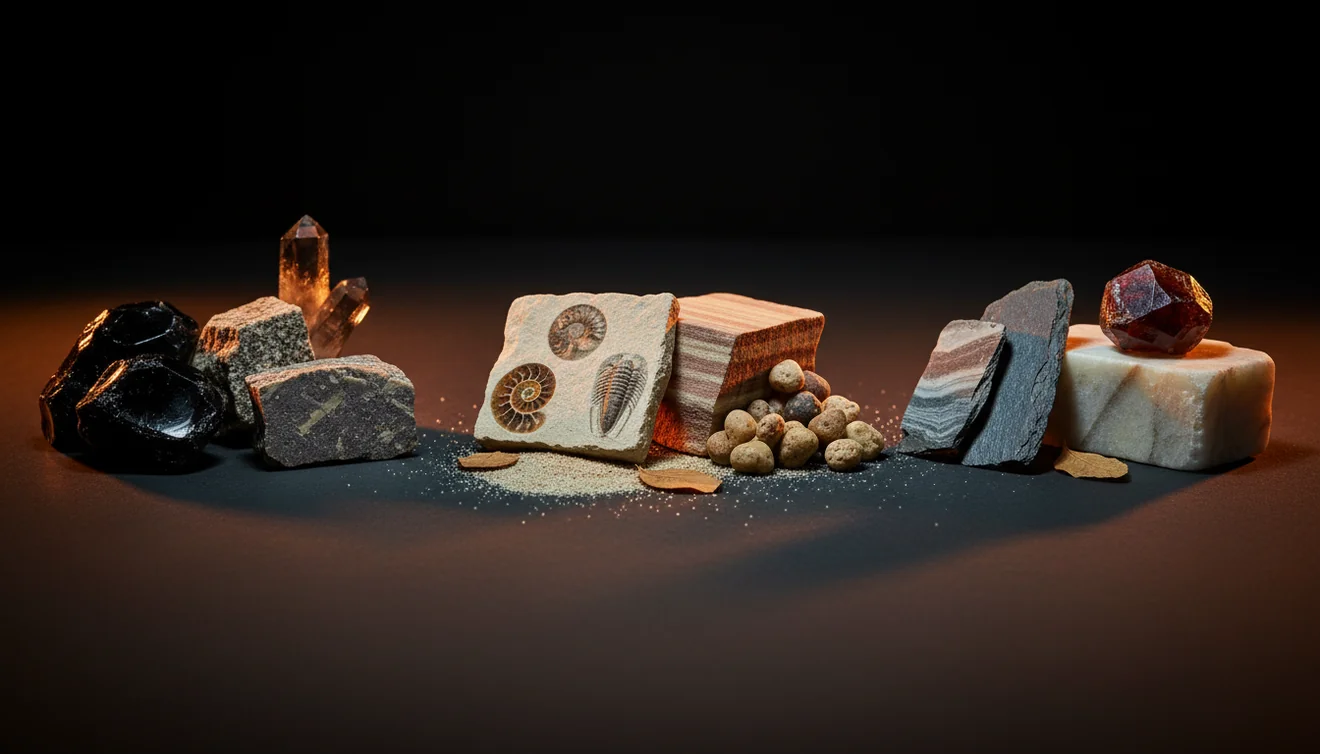
Quick answer: How to tell igneous, sedimentary, and metamorphic rocks apart starts with texture, then structure, then mineral clues. Interlocking crystals, glass, or vesicles often indicate igneous rocks; bedding, fossils, or cemented grains suggest sedimentary rocks; and foliation, banding, or recrystallized minerals point to metamorphic rocks.
AI Rock ID can help users compare visible texture, layering, vesicles, foliation, and grain patterns when sorting igneous, sedimentary, and metamorphic rocks. RockIdentifier.io provides a web photo upload option for a first-pass rock identification that should be checked with field observations such as hardness, bedding, cleavage, and fresh-break texture.
Quick summary
- Best for
- Collectors, hikers, students, teachers, beginners, field hobbyists
- Works on
- Rocks, hand samples, field finds, landscaping stones, classroom specimens
- Accuracy
- Good for field-level sorting when texture and fresh surfaces are visible; not a lab-grade classification.
- Needs confirmation
- Yes
- Professional replacement
- No
- Platforms
- iPhone, iPad, Web
This guide is best for
- Beginners learning the difference between igneous, sedimentary, and metamorphic rocks
- Hikers and field collectors sorting unknown rocks by visible texture and structure
- Students comparing bedding, foliation, crystals, grains, vesicles, and fossils
- Teachers preparing simple rock identification activities with hand samples
- Rockhounds who want a practical checklist before naming a specimen
- Homeowners or gardeners trying to identify landscaping stones at a basic level
Consider another approach if you
- Gemstone buyers who need appraisal, grading, or value estimates
- Researchers who need thin section petrography, XRD, geochemistry, or lab confirmation
- Collectors identifying heavily weathered rocks from only one exterior photo
- People trying to classify concrete, slag, brick, ceramic, or other man-made material as natural rock
- Users who need a legally or commercially certified identification
To tell igneous, sedimentary, and metamorphic rocks apart, look first at texture: interlocking crystals suggest igneous, rounded or cemented grains suggest sedimentary, and recrystallized or aligned minerals suggest metamorphic. Then check structure: bedding and fossils point to sedimentary rocks, while foliation, cleavage, and banding often point to metamorphic rocks. Color is less reliable than grain size, mineral fabric, vesicles, fossils, and simple field tests.
What Is How to Tell Igneous, Sedimentary, and Metamorphic Rocks Apart?
Telling igneous, sedimentary, and metamorphic rocks apart is the practical process of classifying a rock by origin, texture, and fabric. Igneous rocks form from cooled magma or lava, sedimentary rocks form from deposited grains, chemical precipitates, or organic material, and metamorphic rocks form when earlier rocks recrystallize under heat, pressure, or chemically active fluids.
In hand sample work, the fastest evidence is usually grain relationship. Interlocking mineral crystals, glass, or vesicles favor igneous origin; bedding, fossils, mud cracks, or cemented clasts favor sedimentary origin; aligned mica, slaty cleavage, gneissic banding, or a sugary recrystallized mosaic favor metamorphic origin. For a standard geology overview, the USGS explains the rock cycle at https://www.usgs.gov/educational-resources/rock-cycle.
How to Tell Igneous, Sedimentary, and Metamorphic Rocks Apart Works
The method works by separating rock-forming processes from surface appearance. First, texture shows how the material formed: crystals grew from melt, grains were deposited and cemented, or minerals recrystallized in the solid state. Second, structure shows the rock’s history: bedding records deposition, vesicles record trapped gas in lava, and foliation records directed pressure.
Next, mineral tests reduce look-alikes. Quartz-rich sandstone and quartzite can both be hard, but sandstone often shows individual sand grains and cement, while quartzite breaks through grains in a fused mosaic. Basalt and shale may both look dark, but basalt may show vesicles or tiny interlocking crystals, while shale splits along bedding. The photo-based lookup helps generate candidates; hardness, streak, cleavage, and specific gravity confirm them.
How to Tell Igneous, Sedimentary, and Metamorphic Rocks Apart in 5 Steps
Inspect texture first
Look for interlocking crystals, glassy surfaces, clastic grains, or a recrystallized mosaic. Texture usually separates origin better than color because weathering and iron staining can mislead.
Check layering and fabric
Identify flat bedding, cross-beds, fossils, vesicles, foliation, cleavage, or gneissic banding. Bedding is depositional; foliation is mineral alignment from pressure.
Break or view a fresh surface
Use an existing chip or safe fresh edge to see real luster, grain boundaries, fracture, and cleavage. Weathered rinds often hide diagnostic details.
Test simple properties
Compare hardness with a fingernail, copper coin, steel nail, or glass plate. Add streak, magnetism, acid reaction for carbonates, and heft when useful.
Compare candidates
Match your observations against likely rock types, then upload a close, well-lit photo if you want a second pass. Photos are processed for identification only, with privacy-friendly handling.
When to Use How to Tell Igneous, Sedimentary, and Metamorphic Rocks Apart (and When Not To)
Use it when
- Use this workflow when you need a field-level rock type, not a lab-grade mineral analysis.
- Use it for creek finds, trail samples, landscaping stones, classroom collections, and mixed rock batches.
- Use it when texture is visible: crystals, grains, vesicles, bedding, foliation, fossils, or banding.
- Use it before detailed mineral identification, because rock origin narrows the likely minerals and tests.
Skip it when
- Do not rely on it alone for appraisal, gemstone grading, or commercial value estimates.
- Do not use a single weathered exterior photo as final evidence when a fresh surface is available.
- Do not force a three-category answer for man-made slag, concrete, brick, ceramic, or ore concentrate.
- Do not treat photo ID as a substitute for thin section petrography, XRD, geochemistry, or expert lab work.
How to Tell Igneous, Sedimentary, and Metamorphic Rocks Apart vs Google Lens and Stone Identifier
| Feature | Rock Identifier | Google Lens | Stone Identifier |
|---|---|---|---|
| Best use | Rock and mineral photo ID with geology-oriented matches and field notes | Broad visual search across the open web | Crystal and stone lookup for casual collecting |
| Rock type focus | Suggests likely igneous, sedimentary, metamorphic, mineral, or gemstone candidates | May return visually similar objects, products, or unrelated images | Often strongest for common crystals and polished stones |
| Field workflow | Works well with close photos of grain boundaries, fresh breaks, and multiple angles | Useful for comparison images but less structured for geology tests | Helpful for quick names, with variable depth on fabric and origin |
| Verification needed | Confirm with hardness, streak, cleavage, fracture, bedding, foliation, and specific gravity | Confirm heavily because results depend on web image similarity | Confirm especially for dyed, tumbled, or look-alike specimens |
| iOS context | Free photo ID is available in the iOS app for quick field checks | Built into search and camera workflows on many phones | Available as a mobile app for stone and crystal scanning |
Rock Identifier is best used as a geology-specific first pass, not as the final authority. Google Lens is useful for broad visual comparison, while a crystal-focused competitor can be convenient for polished specimens but may give less context on bedding, foliation, vesicles, and rock-forming processes.
Use Cases for Telling Igneous, Sedimentary, and Metamorphic Rocks Apart
- Field collecting: Sort unknown finds quickly by texture and fabric before deciding which samples are worth carrying home. A basalt, shale, and slate can all look dark until you check vesicles, bedding, and cleavage.
- Classroom geology: Teach the rock cycle with hand specimens by connecting observable features to formation. Students can compare sandstone grains, granite crystals, and schist foliation instead of memorizing names only.
- Landscape and construction stone: Identify whether a decorative stone is likely granite, limestone, slate, quartzite, or another durable material. This helps explain weathering behavior, acid sensitivity, and surface texture.
- Trip and trail documentation: Log roadside cuts, beach pebbles, and outcrop samples with notes on bedding direction, grain size, and mineral fabric. Later, the observations are easier to compare than color-only photos.
How to Tell Igneous, Sedimentary, and Metamorphic Rocks Apart Limitations
- Treated stones, dyed crystals, heated material, and resin-filled specimens may show colors or surfaces that do not reflect the original rock type.
- Polished, tumbled, or cabochon-cut specimens often hide grain boundaries, bedding, vesicles, fossils, and foliation, making origin harder to judge.
- Rare minerals, unusual volcanic textures, impact rocks, meteorites, and hydrothermal alteration can fall outside normal field-identification patterns.
- Photo quality matters: blur, glare, wet surfaces, shadows, scale problems, and distant shots can cause a scanner or human observer to over-weight color.
- Value estimates are not reliable from rock type alone. Gem quality, provenance, treatments, size, damage, and market demand require specialist appraisal.
- Fine-grained dark rocks are frequent look-alikes. Basalt, shale, slate, hornfels, chert, and some slags can converge visually without tests.
- A single specimen may contain mixed features, such as a metamorphosed sedimentary rock with relict bedding or an igneous rock altered by fluids.
Common mistakes
- Using color as the main clue even though weathering, iron staining, and grain size can make unrelated rocks look alike.
- Calling every layered rock sedimentary without checking whether the layers are depositional bedding or metamorphic foliation.
- Identifying a rock from a weathered rind instead of looking at a fresh break or clean interior surface.
- Mistaking a hard quartz-rich sandstone for quartzite without checking whether the rock breaks around grains or through fused grains.
- Assuming every dark, fine-grained rock is basalt when shale, slate, and other fine-grained rocks can look similar in photos.
- Treating fossils as the only sedimentary clue even though many sedimentary rocks do not preserve visible fossils.
- Ignoring simple tests such as hardness, streak, acid reaction, magnetism, and cleavage after getting a photo-based suggestion.
Check igneous, sedimentary, and metamorphic rock clues with a photo
A clear photo can provide a useful first pass when texture, layering, vesicles, fossils, or foliation are visible. Confirm the result with a fresh surface and simple field tests before making a final identification.
Related Articles
Frequently Asked Questions
How do I spot igneous rocks?
Look for interlocking crystals, glassy texture, vesicles, or a massive structure without bedding. Granite, basalt, obsidian, pumice, and gabbro are common examples with very different grain sizes.
What makes sedimentary rocks obvious?
Bedding, fossils, rounded grains, mud cracks, ripple marks, and cemented sand or gravel are strong sedimentary clues. Many sedimentary rocks break along depositional layers and may feel gritty.
How is foliation different from bedding?
Foliation is mineral alignment caused by pressure during metamorphism, often showing shiny mica, slaty cleavage, or wavy banding. Bedding is a depositional layer formed when sediment settled or was chemically precipitated.
Can color identify rock type?
Color is a weak clue by itself because weathering, staining, moisture, and grain size change appearance. Use color only after checking texture, structure, mineral content, and simple tests.
Is quartzite sedimentary or metamorphic?
Quartzite is metamorphic because sandstone has recrystallized into a hard, fused quartz mosaic. A key clue is that quartzite often breaks through grains, while sandstone usually breaks around individual grains.
Why do basalt and shale look similar?
Both can be dark and fine-grained, especially on weathered surfaces. Basalt may show vesicles or tiny crystals, while shale commonly splits along thin bedding and may feel softer or more platy.
Do fossils always mean sedimentary?
Fossils are a very strong sedimentary clue because they are usually preserved during deposition and burial. However, weakly metamorphosed rocks can sometimes preserve distorted fossil traces, so check the surrounding fabric.
Which test should I do first?
Start with texture and structure, then use hardness as the first simple physical test. If the rock reacts with dilute acid, shows cleavage, or has unusual heft, those observations can quickly narrow the possibilities.